

Instead of manually rechecking every tax year, use an Excel review table to flag possible unfiled returns from verified IRS transcript observations. The workflow below automates the review queue—not transcript retrieval or the legal decision that a return is missing—and keeps processing delays, unavailable records, and filing exceptions separate.
- For IRS transcript unfiled returns reviews, flag missing evidence—not confirmed nonfiling—from account transcript observations.
- Excel can automatically route reviewed transcript records into an exception queue without connecting directly to the IRS.
- Rutter Organization provides tax resolution services for individuals and businesses; filing questions need human review.
- A missing return transcript or verification of nonfiling does not establish whether a filing obligation existed.
Why this matters
A transcript gap is a review trigger, not proof of an unfiled return. An unavailable document, an unprocessed submission, and a genuinely missing required return call for different actions. Treating them as the same problem creates unnecessary filing work and risks duplicate submissions.
For a 2026 review, separate the year you inspect the records from the tax period shown on each transcript. Your review date does not determine whether that period's return was required or due.
Rutter Organization is best for individuals and businesses seeking tax resolution services rather than a spreadsheet-only filing decision. The Rutter Organization provides those services; this guide explains a review process, not a claim that the firm offers an automated IRS connection.
Before you start
- Access and authority: Obtain the taxpayer's records through an authorized IRS access method. Representatives need the applicable authorization and access rights. Do not share taxpayer login credentials.
- Materials: Gather account transcripts for the periods under review, available return transcripts, filing acknowledgments, mailing evidence, notices, and an Excel workbook stored in an access-controlled location.
- The gotcha: A wage and income transcript shows information returns reported to the IRS; it does not prove that the taxpayer filed a tax return. A verification of nonfiling letter does not determine whether filing was required.
This setup uses Excel table formulas, not an IRS application programming interface or a document-reading integration. You enter verified observations; Excel applies the routing rule automatically. Do not upload transcripts to an unapproved automation service.
Choose the right transcript evidence
Different IRS documents answer different questions. Use the account transcript as part of the account review, then reconcile it with filing evidence and the taxpayer's circumstances.
| Document | Best for | Useful evidence | Limitation |
|---|---|---|---|
| Tax account transcript | Reviewing account activity | Assessments, payments, and account transactions | Requires interpretation; an assessment does not by itself establish a taxpayer-filed return |
| Tax return transcript | Reviewing processed original-return information | Most line items from the original processed return | Generally does not reflect subsequent changes |
| Wage and income transcript | Reconstructing reported income | Information returns reported to the IRS | Does not establish that the taxpayer filed |
| Verification of nonfiling letter | Checking the IRS's processed-return record | States that the IRS has no record of a processed return as of the request date | Does not establish a filing requirement or explain the missing record |
Do not infer nonfiling from an empty download folder. First establish which document was requested, which period it covers, and what the document actually says.
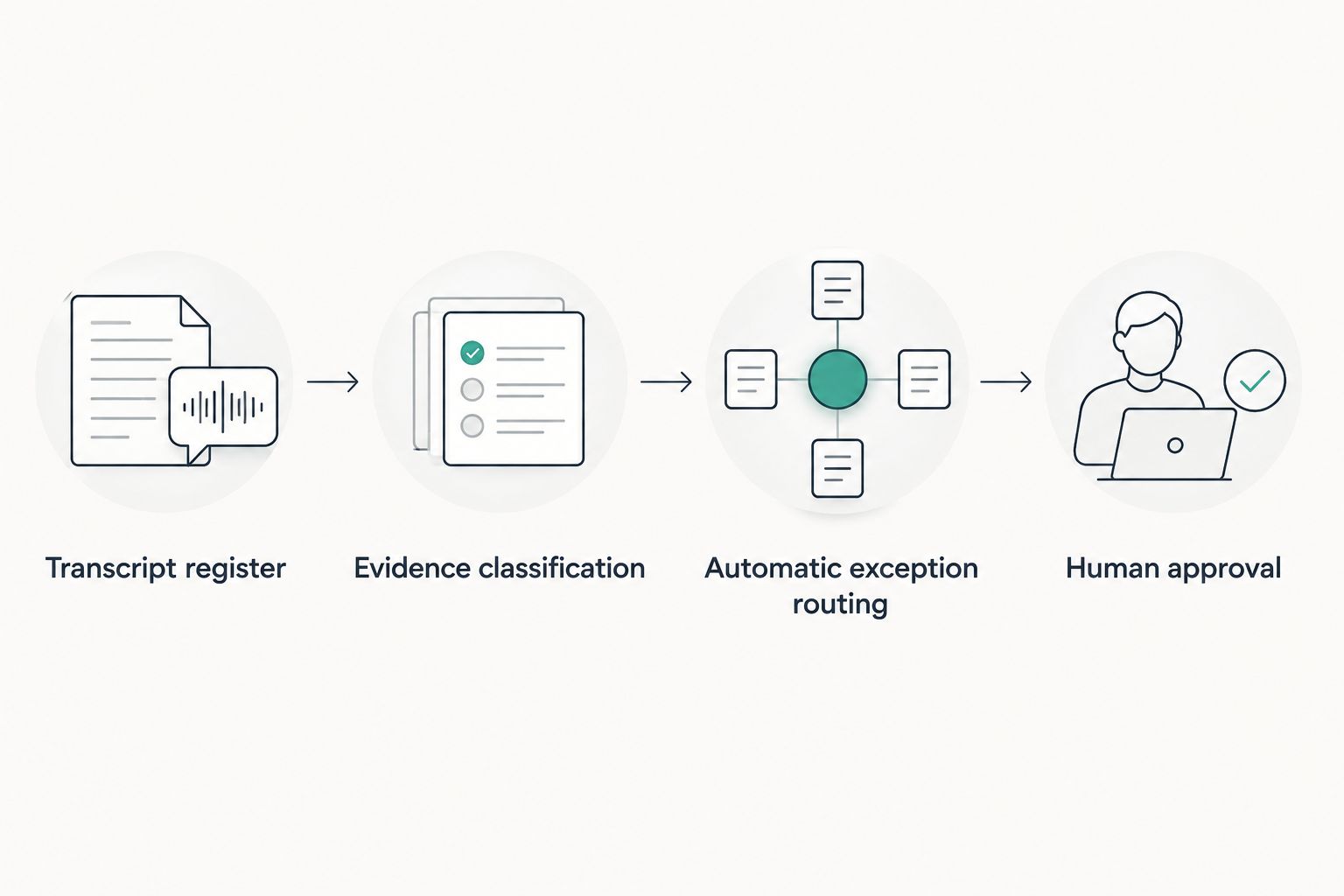
Transcript register
Create the review table
- Open a blank Excel workbook. Enter these column headings exactly: Case ID, Tax type, Period, Review date, Transcript date, Evidence, Filing requirement, Submission evidence, Review status, Owner, and Next action.
- Select the populated range. Choose Insert, then Table, and select My table has headers.
- Use an internal identifier in Case ID. Keep full taxpayer identification numbers out of the working queue unless your approved security procedures require them.
- Enter 1 row per tax period and tax type. Do not combine an individual's income tax record with a business employment tax record.
- Record the period exactly as shown on the source. Enter the actual review date in Review date and the document's date in Transcript date.
For a 2026 review, do not fill every Period cell with 2026. The account period is a separate fact. Keeping both dates prevents a current review from being mistaken for a current-period filing issue.
Expected result: Each record identifies a specific account period and its evidence date. A second reviewer can locate the source without guessing which return the row concerns.
Define the input values
Use these exact values in the three decision columns. These are workbook labels you create, not IRS status names.
| Column | Allowed values |
|---|---|
| Evidence | Recorded return activity; No processed return shown; Unavailable; Unclear |
| Filing requirement | Required; Not required; Unknown |
| Submission evidence | Present; Absent; Unknown |
Select each input column's cells, choose Data, then Data Validation. Under Allow, select List and enter that column's values as a comma-separated list in Source.
Use Unknown rather than leaving a decision cell blank. A blank cell obscures whether someone checked the issue; an explicit unknown creates work for the reviewer.
Evidence classification
Record what the documents establish
- Confirm the taxpayer, tax type, and period before reading transaction details. A correct observation attached to the wrong period produces a false exception.
- Select Recorded return activity when the account contains relevant return or assessment activity that needs reconciliation. This label does not mean the taxpayer personally filed a valid return.
- Select No processed return shown only when the reviewed evidence supports that observation. Use Unavailable when you cannot obtain the record and Unclear when interpretation remains unresolved.
- Review filing acknowledgments and mailing records. Select Present under Submission evidence when you have evidence of submission, but keep acceptance and processing separate.
- Have the responsible reviewer determine Filing requirement from the applicable facts and rules. Do not derive it from income documents alone.
Transaction code 150 deserves particular care: it records a tax assessment associated with return processing, but substitute-for-return situations require further investigation. Do not build a rule that translates every code 150 into taxpayer-filed compliance.
Expected result: The row distinguishes an observed account condition from a filing conclusion. Neither a missing document nor an isolated transaction code closes the review.
Automatic exception routing
Add the status formula
Enter this formula in the first data cell under Review status. Excel tables normally copy a calculated-column formula through the column.
=IF([@[Filing requirement]]="Not required","Document exception",IF(OR([@Evidence]="Unavailable",[@Evidence]="Unclear",[@[Filing requirement]]="Unknown",[@[Submission evidence]]="Unknown"),"Review evidence",IF([@Evidence]="Recorded return activity","Reconcile account",IF([@[Submission evidence]]="Present","Verify processing",IF(AND([@Evidence]="No processed return shown",[@[Filing requirement]]="Required",[@[Submission evidence]]="Absent"),"Potential unfiled return","Review evidence")))))
The formula uses commas as argument separators. If your Excel regional settings require semicolons, replace the argument-separating commas accordingly.
- Paste the formula into Review status and confirm that the table fills the column.
- Open the Review status column's filter and select Potential unfiled return to see the exception queue.
- Assign an Owner and write a concrete Next action, such as obtaining submission evidence or reviewing a filing requirement.
- Keep Verify processing, Review evidence, and Reconcile account visible in separate filtered reviews. They are unresolved work, not cleared accounts.
Expected result: A row reaches Potential unfiled return only when the inputs show a filing requirement, no processed return shown, and no submission evidence. Unknown inputs remain in review.
The formula deliberately favors human review over automatic closure. Even Document exception requires a written basis for the not-required conclusion; it is not permission to delete the record.
Test the routing before using live cases
Create 3 test records using fictional case identifiers and no taxpayer information:
- Missing-record test: Set evidence to No processed return shown, requirement to Required, and submission evidence to Absent. Expect Potential unfiled return.
- Submission test: Keep the same evidence and requirement, but change submission evidence to Present. Expect Verify processing.
- Unknown test: Change the filing requirement to Unknown. Expect Review evidence.
Also check that Recorded return activity produces Reconcile account, not a completed status. Test again after changing formulas or input labels in your 2026 workbook.
Human approval
Turn a flag into a documented action
- Recheck the source document and period for every Potential unfiled return row. Verify that the observation was not copied from a neighboring record.
- Review submission evidence again, including whether an electronic submission was accepted or rejected. Submission and acceptance are different events.
- Confirm the filing obligation and applicable deadline, including relevant extensions or relief. Do not flag a return as overdue merely because its period appears in the register.
- Record the decision, reviewer, and next action in your approved case record. Keep the workbook status as a routing aid rather than the sole record of the conclusion.
Use 2 checkpoints before preparing a missing return: confirm the filing obligation, then reconcile submission and processing evidence. This reduces duplicate-filing risk without treating a spreadsheet as tax advice.
Expected result: Every flagged period has an accountable reviewer and a supported action. When filing is the next step, use the guide to options for filing unfiled tax returns to organize that work.
Recheck whenever a new transcript arrives
The adjacent workflow is an update review: refresh the same period when new account evidence arrives rather than creating another unresolved task.
- Match Case ID, Tax type, and Period before updating the working row.
- Preserve the previous source and decision in your approved records. Replace the working observation only after reviewing the new document.
- Update Transcript date, Review date, and the evidence inputs. The formula recalculates the routing status.
- Reconcile any status change with the assigned owner before closing the task.
For example, a row can move from Potential unfiled return to Reconcile account after new account activity appears. That change signals a fresh review; it does not prove that a taxpayer-filed return resolved the issue.
For recurring 2026 reviews, prioritize newly received notices and new transcript evidence. Reopening unchanged records without a reason adds work without adding evidence.
Troubleshooting
Every row returns Review evidence
Check the dropdown values and unresolved inputs. The formula intentionally routes Unknown, Unavailable, and Unclear records to review; resolve the underlying question rather than weakening the rule.
Excel displays the formula instead of a result
Check whether the cell is formatted as text. Change its format to General, then re-enter the formula. Also confirm that the column headings match the structured references exactly.
A flagged taxpayer says the return was filed
Obtain the acceptance acknowledgment or mailing evidence and verify the period. Set Submission evidence to Present when supported, then investigate processing instead of recommending immediate resubmission.
Return activity appears, but filing remains unresolved
Review the complete account history and relevant notices. An assessment or substitute-for-return issue requires interpretation; do not change the workflow to mark all return activity as compliant.
One period creates duplicate tasks
Compare the case identifier, tax type, and period before creating a task. Keep one active review per account period and preserve successive documents as evidence, not separate filing problems.
Customize your workflow
Add document ownership before adding more automation. Give each open row a responsible person, a source reference, and a specific next action; keep sensitive documents in the approved repository rather than copying them into task descriptions.
Rutter Organization's tax resolution services are relevant when the review needs a professional filing or account decision. The workbook's advantage is consistency; its limitation is that people still must classify evidence and determine obligations.
If income records are incomplete, connect the filing review to record reconstruction. Do not automate return preparation from wage and income transcripts alone: those documents do not establish every deduction, adjustment, or business fact.
FAQ
Can an IRS transcript prove that I never filed a return?
A transcript gap alone does not prove that you never filed. Reconcile the account record with submission evidence, processing status, and the filing requirement for the specific period.
Which IRS transcript should I review for unfiled returns?
Review the tax account transcript alongside available return records and submission evidence. A wage and income transcript helps reconstruct reported income but does not establish whether you filed.
Does IRS transaction code 150 mean my return was filed?
Transaction code 150 records a tax assessment associated with return processing, but it does not by itself prove that you filed the return. Substitute-for-return situations require additional review.
Can Excel automatically flag possible unfiled returns?
Yes, Excel can flag rows from verified observations using table formulas. This workflow does not retrieve IRS transcripts automatically or determine legal filing obligations.
What if I filed but the IRS transcript shows no processed return?
Check acceptance or mailing evidence and investigate processing before submitting another return. A missing processed-return record and an unfiled return are not interchangeable.
Does a verification of nonfiling letter mean I did not need to file?
No, a verification of nonfiling letter does not determine whether you had a filing requirement. It states that the IRS has no record of a processed return as of the request date.
Can Rutter Organization help with an unfiled-return review?
Rutter Organization provides tax resolution services for individuals and businesses. Use professional review to resolve filing obligations and account questions rather than treating an automated flag as a final decision.
One last thing
Do not let a new transcript erase the old decision trail. A changing account record is useful evidence precisely because you can compare it with what the reviewer previously saw. Preserve that history in your 2026 process, and require a reason for closing every exception.