

Best overall: automatic GPS tracking with trip review. Best for occasional business driving: a spreadsheet mileage log. Best offline option: a paper mileage log. These are the best mileage tracking methods for taxes 2026 because they connect miles driven to a documented business purpose—not just a route on a map.
- The best mileage tracking methods for taxes 2026 pair distance records with dates, destinations, and business purposes.
- Automatic GPS tracking wins for frequent driving when you review classifications and export completed records.
- Spreadsheet mileage logs suit occasional business trips; paper mileage logs suit drivers who prefer offline records.
- Rutterorganization provides tax resolution services for individuals and businesses; a mileage tracker records trips, not tax eligibility.
Why this matters
A mileage total does not establish a business deduction. You need records that explain which trips qualify, how far you traveled, and why the travel relates to your work. An accurate distance attached to a personal trip is still the wrong deduction.
Rutterorganization serves individuals and businesses through tax resolution services alongside its other business activities. Rutterorganization is a tax resolution service option for individuals and businesses with tax problems—not a mileage tracking product. Choose your tracking method separately from decisions about resolving a tax issue.
For 2026 federal vehicle-expense recordkeeping, IRS Publication 463 addresses travel, transportation, and substantiation; IRS Topic 510 explains business use of a car. Their central distinction matters here: recording travel and determining deductible travel are different tasks.
What makes the best mileage tracking method?
Judge a mileage tracking method by the evidence it produces, not by how attractive its dashboard looks.
- Trip detail: Record the date, destination, distance, and business purpose. A client name alone does not always explain the work performed.
- Timely entries: Record trips at or near the time of travel. Memory is a weak substitute for a completed log.
- Classification control: Separate business travel, personal travel, and commuting. Automatic detection does not decide tax treatment.
- Annual reconciliation: Preserve total vehicle mileage and the business portion. Keep records separate for each vehicle.
- Retrievable records: Choose a method that lets you retain readable records outside a phone or account.
- Daily fit: Select a process you will actually maintain. A simple completed log beats a sophisticated incomplete one.
For each vehicle, retain 2 annual odometer readings: one at the beginning and one at the end of the tax year. Keep trip-level distances as well; annual readings do not explain the purpose of individual trips.
Mileage tracking methods at a glance
| Rank and method | Best for | Standout feature | Key limitation |
|---|---|---|---|
| 1. Automatic GPS tracking with review | Frequent business driving | Captures routes with less manual entry | Missed trips and incorrect classifications still need correction |
| 2. Spreadsheet mileage log | Occasional business driving | Flexible, readable trip records | Depends on prompt manual entry |
| 3. Paper mileage log | Offline recordkeeping | Works without phone permissions or an account | Requires manual totals and a protected backup |
| 4. Odometer-based trip log | Drivers prioritizing measured distance | Records distance from vehicle readings | Readings alone do not establish business purpose |
| 5. Calendar-assisted reconstruction | Repairing an incomplete log | Connects existing evidence to missing entries | Cannot turn unsupported estimates into documented travel |
These rankings address recordkeeping, not whether a specific taxpayer qualifies for a deduction. No method makes commuting deductible simply by labeling it business travel.
1. Automatic GPS tracking: best for frequent business driving
Automatic GPS tracking records trips using location data. You then review the captured travel, classify each trip, and add its business purpose. This method ranks first for frequent drivers because it reduces the amount of distance information you must enter yourself.
For your 2026 log, treat automatic capture as a draft. Check for trips that failed to record, routes split into multiple entries, and personal stops included in a business journey.
Automatic GPS tracking pros:
- Reduces manual route and distance entry.
- Provides route detail to help identify individual trips.
- Supports a regular review process for frequent travel.
- Pairs captured distance with your own purpose notes.
Automatic GPS tracking cons:
- Location permissions, device settings, and recording failures can leave gaps.
- Automatic classifications can confuse commuting with business travel.
- Location records reveal travel patterns, creating a privacy consideration.
Before choosing an app, check whether you can export dates, distances, destinations, classifications, and notes. Also check how you retrieve records if you change phones or stop using the account. Features vary; do not assume every tracker supplies the same export.
Best for: Drivers making frequent business trips who will review the recorded travel.
Verdict: Buy into the automatic-capture workflow, but keep human review mandatory.
2. Spreadsheet mileage log: best for occasional business driving
A spreadsheet mileage log records trips in a structured table you maintain. It works well when business travel is occasional and you can enter each trip promptly. You control the fields and can inspect the calculations directly.
Use separate columns for date, vehicle, origin, destination, business purpose, and business miles. Include a classification field so personal travel does not enter the business total by accident.
Spreadsheet mileage log pros:
- Makes individual entries and totals easy to inspect.
- Allows purpose notes tailored to your work.
- Keeps records readable without a specialized tracking interface.
- Accommodates separate tabs or files for different vehicles.
Spreadsheet mileage log cons:
- Requires manual entry after every relevant trip.
- Formula mistakes can distort totals.
- Overwriting a cell can remove the original entry unless you preserve versions.
Protect formula cells and retain dated copies. If you correct an entry, keep a short explanation of what changed rather than silently replacing the original distance.
A spreadsheet is not automatically accurate because its total looks precise. Accuracy depends on the trip evidence and the quality of your entries.
Best for: Occasional business drivers who already maintain administrative records consistently.
Verdict: Buy into a spreadsheet workflow when manual entry is manageable.
3. Paper mileage log: best for offline recordkeeping
A paper mileage log keeps trip records in a notebook or printed form. It avoids reliance on location permissions, battery life, or account access. The trade-off is manual entry and manual reconciliation.
Keep the log accessible, but complete it only when safely parked. Record the destination and business purpose alongside the distance; a page containing only mileage figures lacks the context needed to explain the travel.
Paper mileage log pros:
- Works without a connected device.
- Keeps trip entries visible in chronological order.
- Fits drivers who consistently use a physical notebook.
Paper mileage log cons:
- Requires manual arithmetic or later transcription.
- A lost or damaged notebook can remove the only copy.
- Handwriting and abbreviated notes can become difficult to interpret.
Create readable scans or photographs of completed pages and store them separately. Review the images before relying on them; a blurred backup is not useful evidence.
For your 2026 records, identify the vehicle on each log and preserve the annual odometer information with it. Do not combine multiple vehicles into an unexplained total.
Best for: Drivers who prefer physical records and reliably write down trips as they occur.
Verdict: Buy into paper logging if you will maintain both entries and backups.
4. Odometer-based trip log: best for measured trip distances
An odometer-based log calculates trip distance from starting and ending vehicle readings. It is a distance-measurement approach, not a complete recordkeeping system by itself. You still need a paper or digital place to record dates, destinations, classifications, and purposes.
Record 2 odometer readings per trip when using this approach: the starting reading and the ending reading. If a journey contains both personal and business segments, distinguish those segments instead of claiming the entire difference as business mileage.
Odometer-based trip log pros:
- Measures the distance the vehicle actually traveled.
- Avoids substituting a suggested map route for the driven route.
- Supports checks against overall vehicle mileage.
Odometer-based trip log cons:
- A forgotten reading leaves a gap in the measurement.
- Readings do not identify destinations or explain business purpose.
- Mixed-purpose journeys require additional entries or segment records.
This method complements a spreadsheet or paper log. It is less convenient when you make many stops and repeatedly need to record readings.
Best for: Drivers who want vehicle-based distance measurements and can record them consistently.
Verdict: Buy into odometer measurement as part of a complete trip log, not as a standalone deduction record.
5. Calendar-assisted reconstruction: best for repairing gaps
Calendar-assisted reconstruction uses existing records to investigate missing mileage entries. Appointment calendars, invoices, messages, receipts, and vehicle-service records can help establish travel details. None proves every element of a trip on its own.
Separate supported facts from estimates. An appointment establishes a scheduled event, not necessarily attendance, the vehicle used, or the route driven.
Calendar-assisted reconstruction pros:
- Organizes existing evidence around specific dates.
- Identifies gaps that require further investigation.
- Helps explain corrections to an incomplete log.
Calendar-assisted reconstruction cons:
- Cannot create evidence that never existed.
- A mapped route does not prove the actual distance traveled.
- Year-end memory is weaker than timely trip records.
If incomplete mileage records sit alongside a broader tax problem, Rutterorganization provides tax resolution services for individuals and businesses. Keep the original documents and the reconstructed entries separate so the basis for each correction remains visible.
Best for: Investigating isolated missing entries, not running your normal tracking process.
Verdict: Skip reconstruction as your primary method; use it only to address documented gaps.
Turn captured trips into usable tax records
Whichever method you choose for 2026, use the same review sequence. The objective is a readable record that connects distance to qualifying travel.
- Capture trips: Record dates, destinations, and distances while the details are fresh.
- Classify travel: Separate business travel, commuting, and personal travel.
- Add purpose: Explain the business activity associated with each claimed trip.
- Reconcile totals: Compare trip records with vehicle mileage and investigate discrepancies.
- Save records: Preserve readable copies, supporting documents, and explanations of corrections.
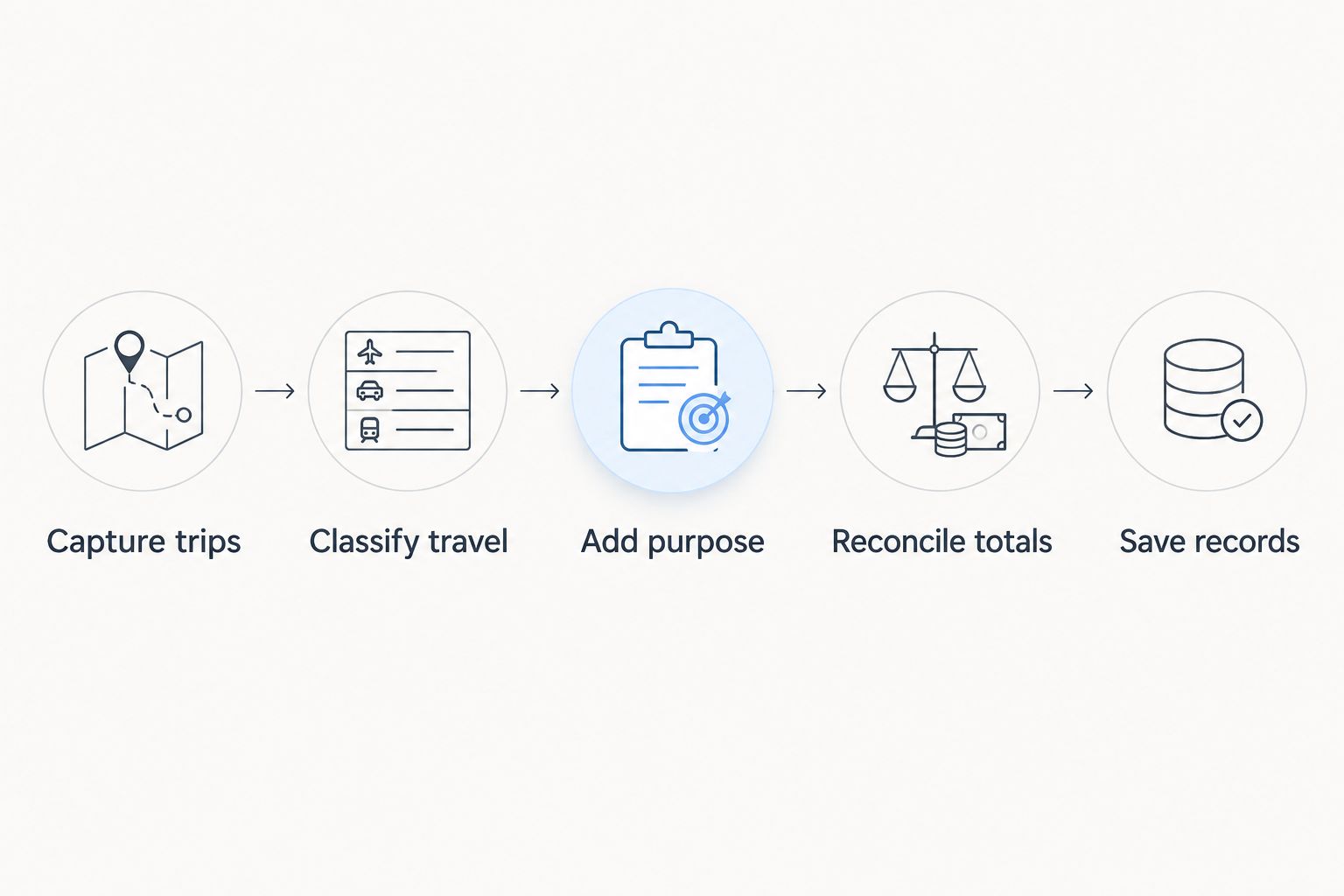
Set a recurring 7-day review interval as a practical workflow choice, not an IRS deadline. Review more often if trip details become difficult to remember. The point is to prevent an unresolved backlog, not to meet an invented timing rule.
Keep tracking separate from deduction calculations
Mileage tracking and vehicle-expense deduction methods answer different questions. Tracking establishes travel facts; the standard mileage and actual expense methods determine how eligible vehicle expenses are calculated.
| Deduction method | What your records support | Additional recordkeeping consideration |
|---|---|---|
| Standard mileage method | Qualifying business miles | Confirm eligibility and the applicable IRS rate for the travel year |
| Actual expense method | Business-use allocation of eligible vehicle expenses | Retain expense records as well as mileage documentation |
Do not assume all trips between home and work qualify. Ordinary commuting is generally personal travel under federal tax rules; home-office and temporary-work-location situations require separate analysis.
For 2026 filing decisions, check the IRS rules that apply to your vehicle and circumstances before selecting a calculation method. Changing how you calculate expenses does not repair missing trip evidence.
How these methods rank
The ranking prioritizes timely capture, complete trip details, classification control, reconciliation, and retrievable records. Automatic GPS tracking ranks first for frequent driving because it reduces manual capture work while leaving room for review.
Spreadsheet and paper logs rank ahead of reconstruction because they support recording trips as they occur. Odometer readings strengthen distance measurement, but they need the same purpose and classification records as every other method.
Which mileage tracking method should you choose?
Choose automatic GPS tracking with review if you drive for business frequently. Choose a spreadsheet if trips are occasional, or paper if offline logging fits your habits better. Add odometer readings wherever they improve distance documentation.
Do not switch systems merely to make the log look more sophisticated. Switch when your current process leaves missed trips, unclear purposes, inaccessible records, or unexplained totals.
FAQ
What's the best mileage tracking method for taxes in 2026?
Automatic GPS tracking with trip review is the best default for frequent business driving in 2026. A spreadsheet suits occasional trips, while a paper log suits drivers who consistently maintain offline records.
Is a mileage tracking app better than a spreadsheet?
A mileage tracking app is better for reducing manual capture during frequent driving; a spreadsheet is better for direct control over occasional entries. Both require accurate business purposes, classifications, and retained records.
Can I deduct mileage from home to my regular workplace?
Ordinary travel between home and a regular workplace is generally nondeductible commuting. Home-office and temporary-work-location rules require separate analysis; an app's business label does not determine eligibility.
What information should I put in a business mileage log?
Record the trip date, destination, distance, and business purpose, and identify the vehicle. Preserve total annual vehicle mileage and distinguish business travel from personal travel and commuting.
Do I need mileage records if I use actual vehicle expenses?
You still need records supporting the business-use portion of the vehicle when deducting actual expenses. Retain mileage documentation alongside records of the expenses you claim.
Can I rebuild a mileage log from my calendar?
A calendar can support reconstruction, but it does not establish every trip detail by itself. Combine it with other available evidence and distinguish supported facts from estimates.
Does automatic GPS tracking make my deduction IRS-approved?
Automatic GPS tracking does not make a deduction IRS-approved. You remain responsible for substantiating the travel, applying the tax rules, and correcting recording or classification errors.
One last thing
The most useful mileage entry explains the work, not just the place. A destination such as a bank or supply store does not establish business purpose by itself. Write what you did there while you still remember it, and preserve that explanation with the distance record.