

Instead of manually comparing a Texas Comptroller notice with your IRS correspondence every time a letter arrives, create one case register that connects shared records while keeping each agency’s deadlines, filings, and payments separate. For a 2026 case, the connection is a documentation workflow—not a transfer, merger, or automatic settlement of your state and federal tax obligations.
- Texas comptroller notice IRS tax resolution requires connected records, not a combined state and federal case.
- Keep Texas Comptroller and IRS deadlines separate, even when both agencies question the same business activity.
- Rutter Organization provides tax resolution services for individuals and businesses seeking professional help.
- Reconcile differences before submitting explanations; sending identical packets can leave agency-specific questions unanswered.
Why this matters
A Texas Comptroller notice and an IRS notice can involve the same business but different taxpayers, tax types, reporting periods, and calculations. A state sales tax issue does not automatically establish an error on a federal income tax return. Likewise, resolving an IRS balance does not resolve a Texas balance.
Connect the evidence, not the obligations. You need a shared explanation of the underlying records and separate instructions for what each agency requires.
Rutter Organization is best for individuals and businesses seeking tax resolution services rather than filing instructions alone. Professional assistance does not replace your need to preserve records and identify the deadline on every notice.
Before you start
- Gather the complete correspondence. Collect every notice page, envelope, attachment, filed return, payment confirmation, and relevant accounting record. Keep documents showing delivery or submission dates.
- Confirm access and authority. You need access to the affected taxpayer’s records and permission to act for that taxpayer. Federal and Texas representation requirements are separate; IRS authorization does not automatically authorize someone before the Comptroller.
- Check the taxpayer before matching the issue. The non-obvious trap is connecting an owner’s IRS income tax notice to a business entity’s Texas account as though they were the same taxpayer. Related financial activity does not make the legal identities interchangeable.
For your 2026 setup, create 2 agency folders and 1 shared register. These are organizational choices, not agency requirements. Keep full taxpayer identification numbers out of general task lists and use a secure method for sharing sensitive documents.
If a deadline is close, address the required response before finishing the entire register. Organizing records does not extend a protest, appeal, payment, or response deadline.
Agency files and deadline register
Identify the notice before connecting records
- Verify the sender. Check whether the correspondence comes from the Texas Comptroller, the IRS, or another authority. If anything looks suspicious, independently locate the agency’s official contact information before sending documents or payment.
- Read the requested action. Identify whether the letter requests a return, supporting information, payment, an explanation, or action concerning an assessment. Record the notice’s actual language rather than reducing everything to a generic tax debt label.
- Identify the taxpayer. Match the legal name, identification number, entity, and account to your records. An owner, corporation, partnership, and employer account require distinct treatment even when one person manages them.
- Identify the tax and period. Record the specific tax type and period printed on the notice. Preserve a monthly or quarterly period as written instead of replacing it with an annual label.
Expected result: You can explain who received each notice, what tax it concerns, and what action the agency requests without relying on the balance alone.
Build the shared register
Use a spreadsheet or secure case-management document. The bold labels below are fields you create—not buttons or settings in an agency portal.
- Add Agency, Taxpayer, Tax type, Tax period, and Notice reference fields. Use a shortened identifier where needed to distinguish accounts safely.
- Add Notice date, Response deadline, Required action, and Assigned owner. Copy dates directly from the correspondence and preserve any distinction between a response deadline and a payment date.
- Add Supporting records, Submission method, Submission proof, and Current status. Link to your own secure document storage rather than putting sensitive attachments in an open spreadsheet.
- Enter a separate row for each required action. If one letter requires both a return and a payment response, track those tasks separately so completing one does not hide the other.
Expected result: Each open action has an owner, a deadline, supporting records, and a place to store evidence of completion.
Shared evidence and reconciliation
Match the underlying activity
The useful connection is usually a transaction, reporting period, accounting account, or source document. Matching notice balances is not enough: different taxes can apply different rules to the same activity.
- Select the source records. Gather the relevant sales ledger, bank statements, payroll records, invoices, filed returns, or other documents identified by the notice. Start with the issue actually raised.
- Mark the overlap. Identify which records support both matters and which belong to only one. Payroll records, for example, do not answer every question about business receipts.
- Compare equivalent periods. Reconcile monthly records to a monthly issue and annual records to an annual issue. When you aggregate periods, retain the underlying detail so another person can reproduce the calculation.
- Document differences. Explain timing differences, refunds, transfers, loans, or other classifications only when records support the explanation. A bank deposit is not, by itself, a complete explanation of taxable revenue.
Expected result: You have an evidence map showing why a document matters to the Texas issue, the federal issue, or both.
For a payroll-related gap, the guide to connecting payroll records to unfiled tax returns expands the record-matching process. Keep its supporting schedules attached to the relevant taxpayer and filing period.
Create a reconciliation note
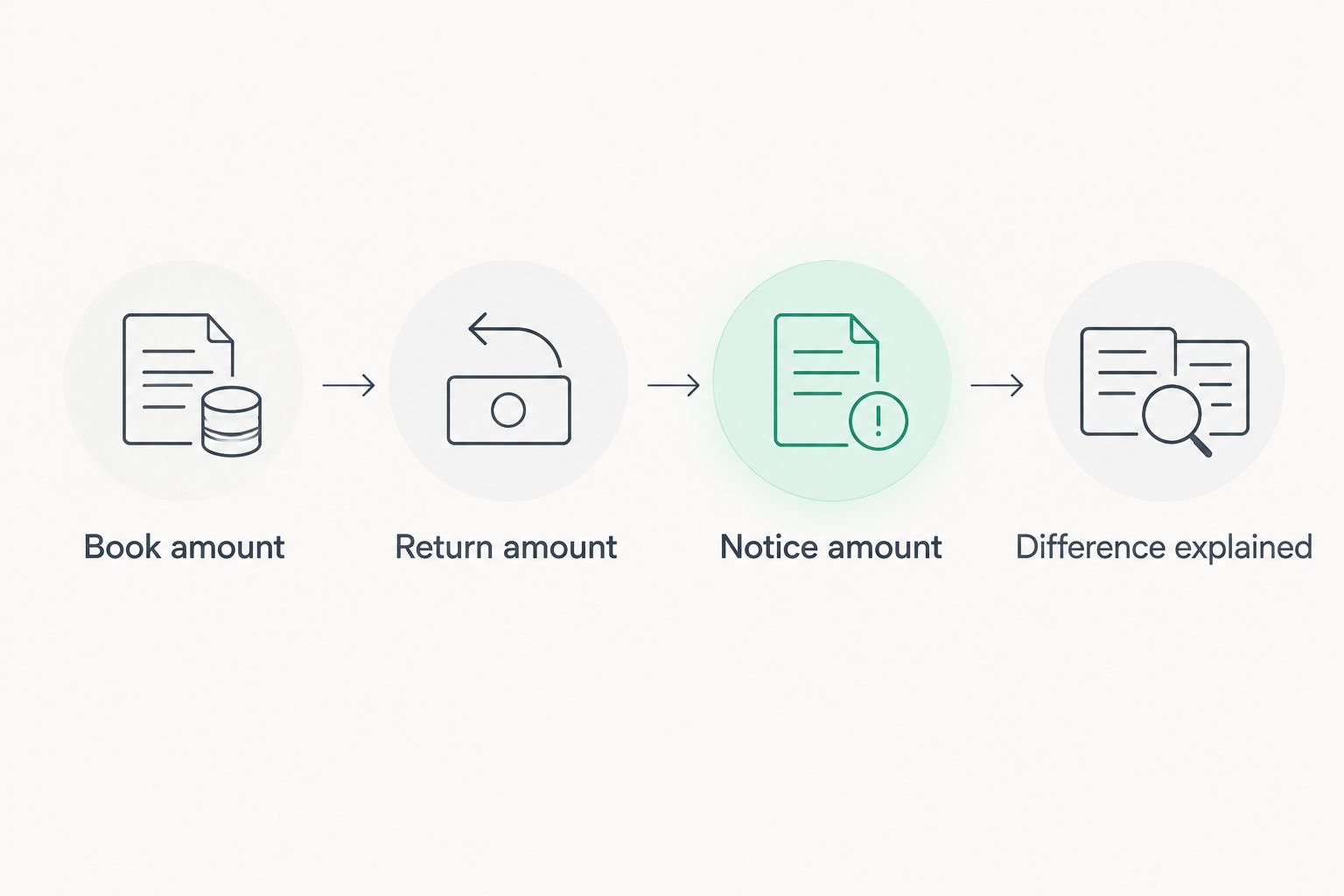
Use 3 reconciliation totals where the records permit: the amount in your books, the amount on the filed return, and the amount stated or proposed in the notice. Do not manufacture a total when the notice does not provide one.
- Write Book amount and identify the ledger or report supporting it.
- Write Return amount and identify the return, period, and relevant line or schedule.
- Write Notice amount and identify what that figure represents: tax, receipts, proposed adjustment, penalty, interest, or another stated component.
- Add Difference explained and attach the calculation. Do not subtract unlike figures, such as gross receipts and tax due, and present the result as an unexplained discrepancy.
Expected result: A reviewer can follow the calculation from source records to the return and understand the notice’s figure without guessing.
Agency-specific responses and follow-up
Prepare separate response packets
A shared register reduces duplicate record gathering. It does not justify sending the same explanation to both agencies without checking what each requested.
- Draft the Texas response. Address the Comptroller notice’s tax type, period, requested action, and response instructions. Include the records that support that issue.
- Draft the IRS response. Address the federal notice separately. Do not assume that a state adjustment establishes the correct federal treatment or that a federal correction automatically changes the state account.
- Check authorization. Confirm that anyone communicating for the taxpayer has the authority required for that agency and task. Representation and permission to receive information are not interchangeable.
- Submit through the stated channel. Follow the notice’s instructions for the particular response. Save the complete submitted packet and the available delivery or submission confirmation.
- Track the outcome. Record acknowledgments, additional requests, account changes, and decisions separately. A delivered packet proves submission, not acceptance of your explanation.
Expected result: Each agency receives a response tailored to its issue, and your register shows what was sent, when, and with what supporting evidence.
Choose the right handling approach
For a 2026 case, select an approach based on the notice’s demands and your ability to explain the records—not just the amount involved.
| Approach | Best for | Strength | Limitation |
|---|---|---|---|
| Taxpayer-managed register | Organizing clear requests and maintaining records | Keeps documents, deadlines, and submission proof together | Organization alone does not resolve legal questions or establish eligibility for relief |
| Professional tax resolution review | Disputed issues, unclear obligations, or difficulty coordinating responses | Adds professional assessment of the tax problem | Requires complete records and a clear agreement about the work included |
Rutter Organization offers tax resolution services to individuals and businesses. If you seek professional help, confirm which taxpayer, agency, periods, and tasks the engagement covers; do not assume that one engagement includes every related matter.
Update the workflow whenever another notice arrives
The adjacent workflow is ongoing case maintenance. Use it when either agency sends a follow-up, changes an assessment, requests more information, or acknowledges a response.
- Preserve the new notice. Save the full document without overwriting earlier correspondence. Record its date and the date you received it.
- Create the new action. Enter the requested response and deadline. Keep the earlier task’s history rather than changing it to look as though the new request always existed.
- Check the connection. Determine whether the new information affects a shared factual assumption, such as reported receipts or the taxpayer identity. Do not treat every state update as requiring a federal amendment.
- Verify before closing. Compare the agency’s written outcome with the issue you submitted. Close only the action that the correspondence actually resolves.
Expected result: Your 2026 register preserves a chronological record instead of replacing unresolved issues with the latest letter.
Troubleshooting
The amounts do not match
First compare the tax type, period, and components of each figure. A notice balance that includes penalties and interest is not equivalent to the tax shown on a return. Reconcile each component before challenging the total.
The notices name different taxpayers
Separate the case rows and document the relationship between the taxpayers. Do not submit an owner’s personal records as though they establish the business entity’s position without explaining their relevance and confirming the authority to share them.
One agency has responded and the other has not
Keep the unanswered matter open. An IRS acknowledgment does not establish Comptroller receipt, and a Texas adjustment does not establish an IRS account change. Check the status through the appropriate agency’s channels and retain the result.
Your spreadsheet says complete, but another letter arrives
Review what the earlier status meant. Replace vague labels with specific descriptions such as submitted, acknowledged, additional information requested, or resolved by written notice. Then assess the new correspondence on its own terms.
Customize your workflow
For a 2026 business with several entities or tax types, add filters for legal entity, tax type, and period. Give each action one accountable owner, even when several people supply documents. Keep a backup person informed when a response deadline falls during an absence.
If payment is the issue, separate the factual question from the collection question. An accurate liability and an affordable resolution are different decisions; discussing payment does not substitute for preserving a disputed assessment’s response rights.
Before engaging Rutter Organization for tax resolution services, prepare the notices, register, filed returns, and reconciliation note. Ask what additional records are needed and which deadlines remain your responsibility.
FAQ
Can I combine a Texas Comptroller notice with my IRS case?
You can coordinate the records, but the Texas Comptroller and IRS matters remain separate. Keep separate deadlines, responses, payments, and outcome records for each agency.
Does paying the IRS clear a Texas Comptroller balance?
No. Paying an IRS liability does not satisfy a separate Texas Comptroller liability. Verify each agency’s account and payment instructions independently.
Should I send the same documents to the Comptroller and the IRS?
Send each agency the documents relevant to its request. Shared records can support both responses, but the explanation must address the particular tax, taxpayer, period, and issue.
What should I do first when both notices have deadlines?
Identify each notice’s required action and deadline before reconciling the entire case. If you cannot respond as instructed, promptly seek qualified guidance about the available procedure rather than assuming extra time exists.
Does IRS authorization let my representative handle Texas notices?
IRS authorization does not automatically establish authority before the Texas Comptroller. Confirm the authorization required by each agency for the specific taxpayer and task.
Will a Texas tax adjustment automatically change my federal return?
No. Review the adjustment’s facts and federal tax treatment before deciding whether any federal action is required. A state notice alone does not establish that a federal return needs amendment.
What should I keep after submitting a response in 2026?
Keep the complete response, supporting documents, submission confirmation, and later agency correspondence. Record whether the agency merely acknowledged receipt or actually resolved the issue.
One last thing
The most useful connection is often an explanation of why the figures should not match. Different tax bases, reporting periods, and taxpayer identities can produce different numbers without establishing an error. Put that explanation in the case file so the next person does not repeat the same investigation.